
From Naive Retrieval to Engineer-Grade Pipelines
Introduction: (How to Build It Right)
We’ve probably seen the hype: “RAG is the solution to hallucinations. Just add our documents and our AI becomes reliable.”
Then we built it. And it failed.
Our retrieval surface was too broad—returning irrelevant chunks. Or too narrow—missing critical context. Our embeddings couldn’t distinguish between “refund policy for digital goods” and “refund policy for services”.
The LLM rambled despite having perfect documentation. Our costs exploded because we embedded every document, every query, every variation.
They ask: “How do I add documents to my LLM?” instead of: “How do I build a retrieval pipeline that:
- Serves queries in 50–200 ms?
- Maintains >70% precision (fewer false positives)?
- Costs <0.01 USD per query (or 0 with local models)?
- Handles 50 different document types correctly?
- Catches hallucinations before they reach users?
- Runs entirely on-premise if needed?”
Lets find answer to those questions.
RAG is treated as infrastructure: with measurable SLAs, domain-specific chunking strategies, evaluation frameworks, and code we can run today. Five architecture patterns help we pick the right one upfront—not after months of painful refactoring. The code is extensible: it runs with local models (zero cost, complete privacy) or remote LLMs (maximum accuracy, managed infrastructure) via configuration, not rewrites. A complete, evaluated end-to-end example ties it together.
By the end, we will have:
- A chunking strategy for Our document types
- A retrieval pattern optimized for Our constraints
- Evaluation metrics that prove it is working
- Semantic Kernel + local SLM and/or remote LLM
- A deployment checklist we can actually ship with
What I covers
- 5 architecture patterns: From simple FAQ-style RAG to iterative agent verification
- Domain-specific chunking: Technical docs, legal clauses, code, FAQs, structured/time-series
- Local vs remote models: Build once, run with:
- Local: Ollama, ONNX (0 USD, on-prem)
- Remote: Azure OpenAI (managed, high accuracy)
- Extensible design: Interfaces for embeddings and LLMs; Semantic Kernel-based implementations
- Evaluation framework: Test cases, precision/recall, category breakdowns, regression checks
- Examples: An extensible
ExtensibleDocumentRAGSystemthat handles ingestion, retrieval, generation, and metrics
The Challenge: RAG is Easy. Reliable RAG is Hard.
Naive RAG looks like this:
- Split documents at fixed 512-token boundaries
- Embed everything with a generic model
- Retrieve top‑5 chunks
- Feed to LLM
- Hope it works
What actually happens:
- Splitting destroys structure: Functions separate from docstrings; contract clauses lose references; FAQs split Q from A.
- Embeddings mismatch domain: Legal, medical, and code need different behavior than general semantic search.
- Retrieval lacks recall: The relevant chunk is ranked 7th, but we only fetch 5. Or we get five near-duplicate chunks.
- Generation hallucinates: The LLM fills gaps instead of saying “I don’t know.”
- Costs explode: We increase k to compensate, tokens increase, latency and bills follow.
Reliable RAG requires engineering discipline:
- Parse, don’t blind-split: Respect document structure.
- Model selection based on task and constraints: Local vs remote, speed vs quality.
- Measure retrieval independently: Before calling an LLM, know Our retrieval P@5 and R@5.
- Make it observable: Latency, cost, and quality metrics for each layer.
- Keep backends pluggable: Local SLMs for development/on-prem; remote LLMs when needed—without invasive changes.
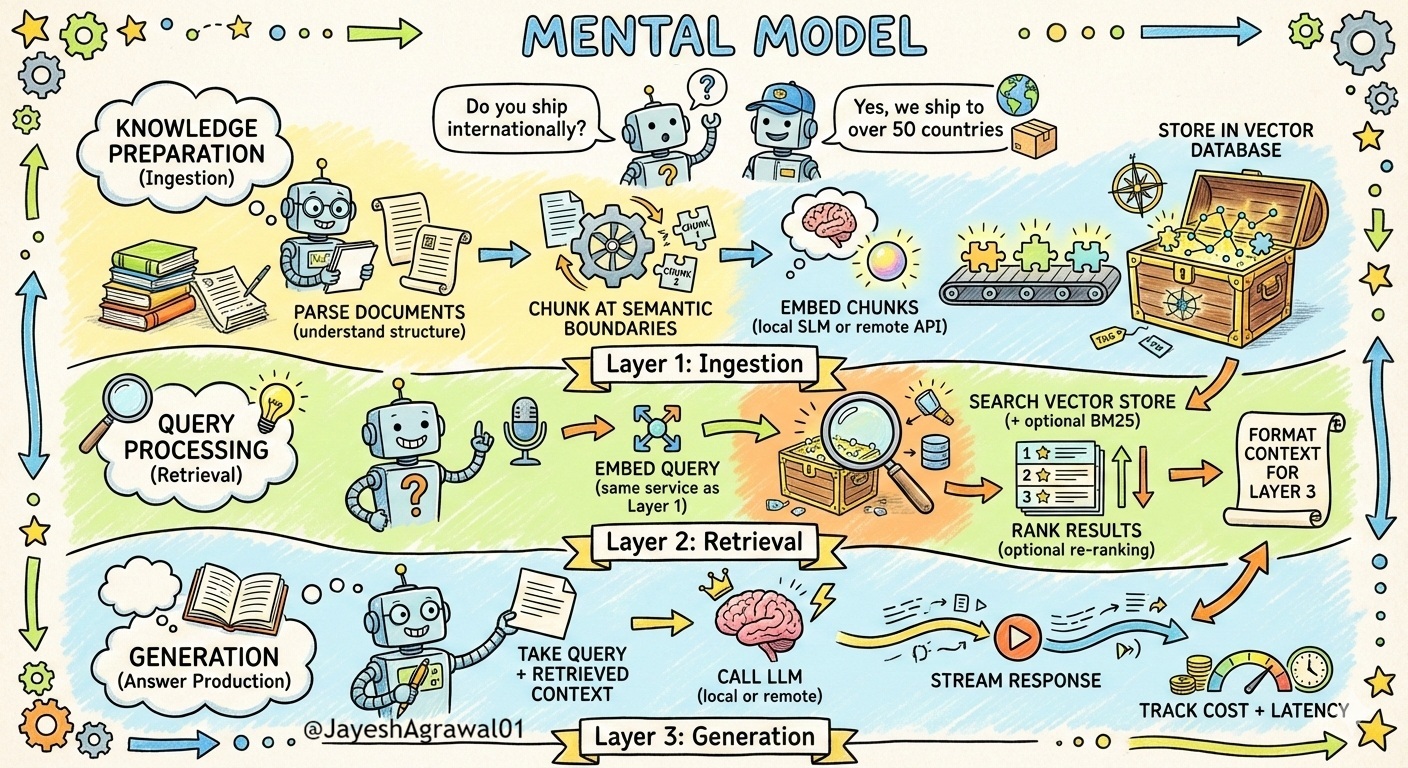
A Three-Layer Mental Model
Think of RAG as three independent, measurable layers:
1
2
3
4
5
6
7
8
9
10
11
12
13
14
15
16
17
Layer 1: Knowledge Preparation (Ingestion)
├─ Parse documents (understand structure)
├─ Chunk at semantic boundaries
├─ Embed chunks (local SLM or remote API)
└─ Store in vector database

Layer 2: Query Processing (Retrieval)
├─ Embed query (same service as Layer 1)
├─ Search vector store (+ optional BM25)
├─ Rank results (optional re-ranking)
└─ Format context for Layer 3

Layer 3: Generation (Answer Production)
├─ Take query + retrieved context
├─ Call LLM (local or remote)
├─ Stream response
└─ Track cost + latency
Each layer has SLAs (latency, accuracy, cost) and pluggable backends. Lets implement this in Semantic Kernel, local SLMs, and remote LLMs.
1. What RAG Actually Is: An Engineering Definition
At its core, RAG is a typed data pipeline we own, operate, and optimize.
Pipeline shape:
- Input: Query string + optional context (user ID, filters, metadata)
- Stage 1 (Embedding): Convert query to a vector (local SLM or remote API)
- Stage 2 (Retrieval): Find top‑k most similar document vectors
- Stage 3 (Ranking): Reorder based on additional relevance signals
- Stage 4 (Context Preparation): Format chunks for an LLM prompt
- Output: Structured context (chunks, scores, source IDs, confidence) for generation
When treated as infrastructure, we ask:
- What is acceptable latency: 50 ms, 200 ms, 1 s?
- What precision/recall are required?
- What is the max acceptable cost per query?
- How are embedding/LLM model changes validated?
- How is retrieval correctness tested?
Lets answers these from an engineering perspective.
2. Five Architecture Patterns for .NET RAG Systems
Most teams build only a “sequential” pattern. That works for trivial cases but is suboptimal elsewhere. These five patterns let we pick intentionally.
Pattern 1: Simple Sequential RAG (Baseline)
1
Query → Embed (Local SLM) → Vector Search → Top‑k Chunks → LLM
When to use:
- Corpus < 100k documents
- Simple, single-intent queries
- Low accuracy bar: “good enough”
- On-premise / cost-sensitive
Pros:
Simple, low latency, fully local.
Cons:
No hybrid search, struggles with very keyword-heavy domains.
Pattern 2: Hybrid Retrieval Pipeline
1
Query → [BM25 Branch + Dense Embedding (Local/Remote)] → Score Fusion → Rerank → LLM
When to use:
- Heavy domain-specific terminology (legal/medical/technical)
- Mix of “ID-style” queries and semantic ones
- Latency 50–200 ms is acceptable
Pros:
Combines exact keyword matches and semantics.
Cons:
More moving parts (BM25 + vector store + fusion).
Implement via Reciprocal Rank Fusion (RRF):
Pattern 3: Multi-Index Strategy with Agent Routing
1
Query → Agent (Semantic Kernel) → Classifier Plugin → Target Index → Retrieve → LLM
When to use:
- Heterogeneous corpora (API docs, FAQs, legal, community posts)
- Need index-specific chunking and tuning
>500k docs across types
Pros:
Each index is optimized independently; improved precision.
Cons:
Requires an agent classifier and multiple indexes.
Pattern 4: Adaptive Retrieval (Query-Aware Top‑K)
1
Query → Complexity Analysis (Local SLM or heuristics) → Select k → Retrieve → LLM
When to use:
- High query volume
- Wide mix of query complexity
- Cost or latency sensitive
Pros:
Big savings on tokens and retrieval without hurting accuracy.
Cons:
Complexity classifier must not be too expensive.
Pattern 5: Iterative Refinement RAG with Verification
1
Query → Retrieve → Draft Answer → Confidence Score → (Optional) Refined Query → Retrieve → Final Answer
When to use:
- High-stakes use (medical, legal, compliance)
- Need explicit verification passes
- Accept higher latency
3. Domain-Specific Chunking: Beyond Generic Splits
Chunking is where most RAG systems lose points. Generic 512-token splits work fine for general text but fail for structured content.
Chunking for Technical Documentation
Documentation has structure: headers, code blocks, explanations.
Problem with generic chunking: Code example gets split from its explanation. Header loses context.
Smart approach:
- Parse the document structure (markdown or HTML)
- Group content by heading level
- Keep code blocks + explanations together
- Include breadcrumb metadata
Chunking for Legal / Compliance Documents
Legal documents have clause numbers, cross-references, and defined terms that matter.
Problem with generic chunking: Loses clause structure. Cross-references (“See Section 5.2”) become useless.
Smart approach:
- Preserve clause numbers and section boundaries
- Add metadata for all cross-references
- Keep defined terms together
- Track version/date
Chunking for Code + Docstrings
Code needs context: function signature, docstring, usage example.
Problem: If we split at arbitrary boundaries, we separate the function from its documentation.
Smart approach:
- Parse at language-aware boundaries (functions, classes, methods)
- Keep docstring + implementation + example together
- Include language/framework metadata
Chunking for FAQ / Q&A Pairs
FAQs should never split Q from A.
Problem: Generic chunking might put “Q: How do I reset my password?” in one chunk and the answer in another.
Smart approach:
- Keep Q&A pairs together
- Add question as metadata (for keyword search)
- Include context tags (e.g., “topic: authentication”)
4. Local SLM Embedding Options for .NET
Packages:
1
2
3
Microsoft.SemanticKernel
Microsoft.SemanticKernel.Connectors.Ollama
Microsoft.SemanticKernel.Connectors.Onnx
Instead of relying on expensive API-based embeddings, use local Small Language Models (SLMs) running in .NET.
Option 1: Ollama (Recommended for Development)
Setup:
1
2
ollama pull nomic-embed-text
# Runs on http://localhost:11434
Semantic Kernel Integration:
1
2
3
4
5
6
7
8
9
10
11
12
13
14
15
16
17
18
19
20
21
22
23
24
25
26
27
28
29
30
public class OllamaEmbeddingService : IEmbeddingService
{
    private readonly Kernel _kernel;
    private readonly IEmbeddingGenerator<string, Embedding<float>> _service;

    public OllamaEmbeddingService(Uri ollamaEndpoint)
    {
        var builder = Kernel.CreateBuilder();
        builder.AddOllamaEmbeddingGenerator("nomic-embed-text", ollamaEndpoint);

        _kernel = builder.Build();
        _service = _kernel.GetRequiredService<IEmbeddingGenerator<string, Embedding<float>>>();
    }

    public async Task<Embedding<float>> EmbedTextAsync(string text)
    {
        var embedding = await _service.GenerateAsync(text);
        return embedding;
    }

    public async Task<List<Embedding<float>>> EmbedBatchAsync(List<string> texts)
    {
        var list = new List<Embedding<float>>();
        foreach (var text in texts)
            list.Add(await EmbedTextAsync(text));
        return list;
    }

    public string GetBackendName() => "Ollama (Local)";
}
Performance: ~100ms per embedding locally, fully offline.
Cost: 0 USD (runs on Our hardware).
Option 2: Azure OpenAI (When Local SLMs Aren’t Enough)
For maximum accuracy, use Azure OpenAI while maintaining control:
1
2
3
4
5
6
7
8
9
10
11
12
13
14
15
16
17
18
19
20
21
22
23
24
25
26
27
28
29
30
public class AzureOpenAIEmbeddingService : IEmbeddingService
{
    private readonly Kernel _kernel;
    private readonly IEmbeddingGenerator<string, Embedding<float>> _service;

    public AzureOpenAIEmbeddingService(string deploymentName, string endpoint, string apiKey)
    {
        var builder = Kernel.CreateBuilder();
        builder.AddAzureOpenAIEmbeddingGenerator(deploymentName, endpoint, apiKey);

        _kernel = builder.Build();
        _service = _kernel.GetRequiredService<IEmbeddingGenerator<string, Embedding<float>>>();
    }

    public async Task<Embedding<float>> EmbedTextAsync(string text)
    {
        var embedding = await _service.GenerateAsync(text);
        return embedding;
    }

    public async Task<List<Embedding<float>>> EmbedBatchAsync(List<string> texts)
    {
        var list = new List<Embedding<float>>();
        foreach (var text in texts)
            list.Add(await EmbedTextAsync(text));
        return list;
    }

    public string GetBackendName() => "Azure OpenAI (Remote)";
}
Option 3: Hybrid Fallback (Local Primary, Remote Fallback)
1
2
3
4
5
6
7
8
9
10
11
12
13
14
15
16
17
18
19
20
21
22
23
24
25
26
27
28
29
30
31
32
33
34
35
36
37
38
39
40
public class HybridEmbeddingService : IEmbeddingService
{
    private readonly IEmbeddingService _primary;
    private readonly IEmbeddingService _fallback;

    public HybridEmbeddingService(IEmbeddingService primary, IEmbeddingService fallback)
    {
        _primary = primary;
        _fallback = fallback;
    }

    public async Task<float[]> EmbedTextAsync(string text)
    {
        try
        {
            return await _primary.EmbedTextAsync(text);
        }
        catch
        {
            Console.WriteLine($"Primary failed ({_primary.GetBackendName()}), using fallback ({_fallback.GetBackendName()})");
            return await _fallback.EmbedTextAsync(text);
        }
    }

    public async Task<List<float[]>> EmbedBatchAsync(List<string> texts)
    {
        try
        {
            return await _primary.EmbedBatchAsync(texts);
        }
        catch
        {
            Console.WriteLine("Primary batch embedding failed, using fallback.");
            return await _fallback.EmbedBatchAsync(texts);
        }
    }

    public string GetBackendName() =>
        $"{_primary.GetBackendName()} (with {_fallback.GetBackendName()} fallback)";
}
Use case: Development: use local (fast, free). Production: local works 99% of time, Azure handles edge cases or high volume.
5. Building an Evaluation Framework in .NET
Here’s the hard truth: if we’re not measuring retrieval quality, we don’t know if it is working.
Step 1: Create Our Test Dataset
1
2
3
4
5
6
7
8
9
10
public class RagTestCase
{
    public string Query { get; set; }
    public string ExpectedAnswer { get; set; }
    public List<string> RelevantChunkIds { get; set; }
    public string Category { get; set; }
    public int DifficultyScore { get; set; }
    public DateTime CreatedDate { get; set; }
    public string Notes { get; set; }
}
Build 30–50 test cases covering:
- Different document types
- Different query styles (direct lookups, comparisons, multi-step)
- Edge cases
- Difficulty gradient
Example:
1
2
3
4
5
6
Query: "What's the refund policy for digital goods?"
Expected: "Refunds allowed within 14 days if unused"
Relevant Chunks: ["doc_5_section_2.3", "doc_5_section_2.4"]
Category: "compliance"
Difficulty: 2
Notes: "Should distinguish from physical goods policy"
Step 2: Define Metrics
1
2
3
4
5
6
7
8
9
10
11
12
13
14
15
16
17
18
19
20
21
22
23
24
25
26
27
28
29
30
31
32
33
34
35
36
37
38
39
40
41
42
public class RagEvaluator
{
    public decimal Precision(List<string> retrievedIds, List<string> relevantIds, int k)
    {
        var topK = retrievedIds.Take(k).ToList();
        var hits = topK.Intersect(relevantIds).Count();
        return (decimal)hits / k;
    }

    public decimal Recall(List<string> retrievedIds, List<string> relevantIds, int k)
    {
        var topK = retrievedIds.Take(k).ToList();
        var hits = topK.Intersect(relevantIds).Count();
        return relevantIds.Count == 0 ? 1m : (decimal)hits / relevantIds.Count;
    }

    public int FirstRelevantRank(List<string> retrievedIds, List<string> relevantIds)
    {
        for (int i = 0; i < retrievedIds.Count; i++)
        {
            if (relevantIds.Contains(retrievedIds[i]))
                return i + 1;
        }
        return retrievedIds.Count + 1;
    }

    public Dictionary<string, decimal> AccuracyByCategory(
        List<RagTestCase> testCases,
        Dictionary<string, List<string>> results)
    {
        return testCases
            .GroupBy(t => t.Category)
            .ToDictionary(
                g => g.Key,
                g => g.Average(t =>
                {
                    var retrieved = results[t.Query];
                    return Recall(retrieved, t.RelevantChunkIds, 5);
                })
            );
    }
}
Step 3: Evaluation Loop
1
2
3
4
5
6
7
8
9
10
11
var baseline = evaluator.EvaluateSystem(testSet);
Console.WriteLine($"Baseline P@5: {baseline.Precision:P}, R@5: {baseline.Recall:P}");

var byCategory = evaluator.AccuracyByCategory(testSet, results);
foreach (var (category, accuracy) in byCategory)
{
    Console.WriteLine($"{category}: {accuracy:P}");
}

// Adjust strategy, re-evaluate
var v2 = evaluator.EvaluateSystem(testSet);
Target: Aim for P@5 > 70% and R@5 > 65% before going to production.
6. Extensible Example
6.1 Extensible Embedding Service Interface
1
2
3
4
5
6
public interface IEmbeddingService
{
    Task<float[]> EmbedTextAsync(string text);
    Task<List<float[]>> EmbedBatchAsync(List<string> texts);
    string GetBackendName();
}
6.2 ExtensibleDocumentRAGSystem
1
2
3
4
5
6
7
8
9
10
11
12
13
14
15
16
17
18
19
20
21
22
23
24
25
26
27
28
29
30
31
32
33
34
35
36
37
38
39
40
41
42
43
44
45
46
47
48
49
50
51
52
53
54
55
56
57
58
59
60
61
62
63
64
65
66
67
68
69
70
71
72
73
74
75
76
77
78
79
80
81
82
83
84
85
86
87
88
89
90
91
92
93
94
95
96
97
98
99
100
101
102
103
104
105
106
107
108
109
110
111
112
113
114
115
116
117
118
119
120
121
122
123
124
125
126
127
128
129
130
public class ExtensibleDocumentRAGSystem
{
    private readonly IEmbeddingService _embeddingService;
    private readonly ILlmService _llmService;
    private readonly VectorStore _vectorStore = new();
    private readonly List<QueryMetrics> _metrics = new();

    public ExtensibleDocumentRAGSystem(IEmbeddingService embeddingService, ILlmService llmService)
    {
        _embeddingService = embeddingService;
        _llmService = llmService;

        Console.WriteLine($"✓ Embedding backend: {embeddingService.GetBackendName()}");
        Console.WriteLine($"✓ LLM backend: {llmService.GetBackendName()}");
    }

    public async Task IngestDocumentsAsync(List<string> docs)
    {
        var chunker = new DocumentationChunker();
        var totalChunks = 0;

        foreach (var doc in docs)
        {
            var chunks = chunker.ChunkMarkdownDocument(doc);
            foreach (var chunk in chunks)
            {
                var embedding = await _embeddingService.EmbedTextAsync(chunk.Text);
                _vectorStore.AddChunk(new ChunkWithEmbedding
                {
                    Id = Guid.NewGuid().ToString(),
                    Text = chunk.Text,
                    Metadata = chunk.Metadata,
                    Embedding = embedding
                });
                totalChunks++;
            }
        }

        Console.WriteLine($"✓ Ingested {docs.Count} documents, {totalChunks} chunks total");
    }

    private async Task<List<ChunkWithEmbedding>> RetrieveAsync(string query, int k)
    {
        var queryEmbedding = await _embeddingService.EmbedTextAsync(query);
        return _vectorStore.SearchSimilar(queryEmbedding, k);
    }

    public async Task<(string answer, QueryMetrics metrics)> GenerateAnswerAsync(string query)
    {
        var sw = System.Diagnostics.Stopwatch.StartNew();
        var start = DateTime.UtcNow;

        var retrievalStart = sw.ElapsedMilliseconds;
        var chunks = await RetrieveAsync(query, 5);
        var retrievalMs = (int)(sw.ElapsedMilliseconds - retrievalStart);

        if (chunks.Count == 0)
        {
            return ("No relevant information found.", new QueryMetrics
            {
                Query = query,
                RetrievedChunks = 0,
                RetrievalLatencyMs = retrievalMs,
                GenerationLatencyMs = 0,
                TotalLatencyMs = (int)sw.ElapsedMilliseconds,
                Timestamp = start,
                EmbeddingBackend = _embeddingService.GetBackendName(),
                LlmBackend = _llmService.GetBackendName()
            });
        }

        var context = new StringBuilder();
        foreach (var c in chunks)
            context.AppendLine($"- {c.Text.Substring(0, Math.Min(150, c.Text.Length))}...");

        var genStart = sw.ElapsedMilliseconds;
        var answer = await _llmService.GenerateWithContextAsync(query, context.ToString());
        var genMs = (int)(sw.ElapsedMilliseconds - genStart);

        sw.Stop();

        var metrics = new QueryMetrics
        {
            Query = query,
            RetrievedChunks = chunks.Count,
            RetrievalLatencyMs = retrievalMs,
            GenerationLatencyMs = genMs,
            TotalLatencyMs = (int)sw.ElapsedMilliseconds,
            Timestamp = start,
            EmbeddingBackend = _embeddingService.GetBackendName(),
            LlmBackend = _llmService.GetBackendName()
        };

        _metrics.Add(metrics);

        return (answer, metrics);
    }

    public void PrintMetricsSummary()
    {
        if (_metrics.Count == 0)
        {
            Console.WriteLine("No queries yet.");
            return;
        }

        Console.WriteLine("\n==============================");
        Console.WriteLine("QUERY METRICS SUMMARY");
        Console.WriteLine("==============================");

        var avgRetrieval = _metrics.Average(m => m.RetrievalLatencyMs);
        var avgGen = _metrics.Average(m => m.GenerationLatencyMs);
        var avgTotal = _metrics.Average(m => m.TotalLatencyMs);

        Console.WriteLine($"Total queries: {_metrics.Count}");
        Console.WriteLine($"Embedding backend: {_embeddingService.GetBackendName()}");
        Console.WriteLine($"LLM backend: {_llmService.GetBackendName()}");
        Console.WriteLine($"Retrieval latency (avg): {avgRetrieval:F0} ms");
        Console.WriteLine($"Generation latency (avg): {avgGen:F0} ms");
        Console.WriteLine($"Total latency (avg): {avgTotal:F0} ms\n");

        foreach (var m in _metrics)
        {
            Console.WriteLine($"Q: \"{m.Query}\"");
            Console.WriteLine($"   Retrieval: {m.RetrievalLatencyMs} ms | Generation: {m.GenerationLatencyMs} ms | Total: {m.TotalLatencyMs} ms");
        }

        Console.WriteLine("==============================");
    }
}
7. Where This Fits: RAG as Our Agent’s Knowledge Layer
This RAG pipeline with pluggable backends becomes the knowledge layer for agents:
- Single-turn Q&A: Retrieve docs, generate answer
- Multi-turn conversations: Maintain context, retrieve relevant updates
- Tool-using agents: RAG as a tool/function the agent can call
- Workflow automation: Agents orchestrate retrieval + decision-making
Semantic Kernel plugins let us create sophisticated pipelines entirely in .NET.
Conclusion
we now have:
- Five architecture patterns to pick from based on constraints
- Domain-specific chunking for technical, legal, code, FAQ, and time-series data
- Local and remote embedding options, all behind a single interface
- Evaluation framework to measure and improve retrieval accuracy
RAG is infrastructure. Build it intentionally, measure it rigorously, and keep it simple until we have evidence we need complexity.
Start with Pattern 1 (Simple Sequential) + local SLMs (Ollama). Measure retrieval accuracy. If we need better, add hybrid retrieval. If we need speed, move to ONNX. If we need maximum accuracy, switch to Azure—without rewriting business logic.
That is reliable RAG.
Reference: Semantic Kernel.